Ken je toeleveringsketen. Know your supply chain. Kenne deine Lieferkette. Connaissez votre chaîne d'approvisionnement.
Voor CBAM is niet de handelaar maar de fabrikant leidend. De Workspace maakt een duidelijk onderscheid tussen leveranciers (wie verkoopt) en producenten (wie maakt), en koppelt ze aan productie-installaties. For CBAM, the manufacturer — not the trader — is leading. The Workspace makes a clear distinction between suppliers (who sells) and producers (who makes), and links them to production installations. Für CBAM ist nicht der Händler, sondern der Hersteller maßgebend. Der Workspace unterscheidet klar zwischen Lieferanten (wer verkauft) und Produzenten (wer herstellt) und verknüpft sie mit Produktionsanlagen. Pour le CBAM, c'est le fabricant — et non le négociant — qui est déterminant. Le Workspace distingue clairement les fournisseurs (qui vend) des producteurs (qui fabrique), et les associe aux installations de production.
Leverancier vs. Producent — het verschil Supplier vs. Producer — the difference Lieferant vs. Produzent — der Unterschied Fournisseur vs. Producteur — la différence
LeverancierSupplierLieferantFournisseur
De partij van wie u inkoopt — de handelaar of exporteur. Dit is de naam op de factuur. The party you purchase from — the trader or exporter. This is the name on the invoice. Die Partei, von der Sie kaufen — der Händler oder Exporteur. Dies ist der Name auf der Rechnung. La partie auprès de laquelle vous achetez — le négociant ou l'exportateur. C'est le nom figurant sur la facture.
Voorbeeld: "ArcelorMittal Trading BV" Example: "ArcelorMittal Trading BV" Beispiel: „ArcelorMittal Trading BV" Exemple : « ArcelorMittal Trading BV »
ProducentProducerProduzentProducteur
De partij die de goederen heeft gefabriceerd. Leidend voor de emissiefactor en de productie-installatie. Verplicht in het EU-rapport. The party that manufactured the goods. Leading for the emission factor and production installation. Required in the EU report. Die Partei, die die Waren hergestellt hat. Maßgebend für Emissionsfaktor und Produktionsanlage. Im EU-Bericht erforderlich. La partie qui a fabriqué les marchandises. Déterminant pour le facteur d'émission et l'installation de production. Obligatoire dans le rapport UE.
Voorbeeld: "ArcelorMittal Ukraine" Example: "ArcelorMittal Ukraine" Beispiel: „ArcelorMittal Ukraine" Exemple : « ArcelorMittal Ukraine »
Anders-model: als de producent onbekend is, geldt de EU-standaard emissiefactor automatisch. Een amber badge op de leverancierslijst geeft aan dat er nog geen producent is gekoppeld. Unknown model: if the producer is unknown, the EU default emission factor applies automatically. An amber badge on the supplier list indicates that no producer has been linked yet. Unbekannt-Modell: Ist der Produzent unbekannt, gilt automatisch der EU-Standard-Emissionsfaktor. Ein Bernstein-Badge in der Lieferantenliste zeigt an, dass noch kein Produzent verknüpft wurde. Modèle inconnu : si le producteur est inconnu, le facteur d'émission par défaut de l'UE s'applique automatiquement. Un badge ambré dans la liste des fournisseurs indique qu'aucun producteur n'a encore été associé.
LeveranciersoverzichtSupplier overviewLieferantenübersichtVue d'ensemble des fournisseurs
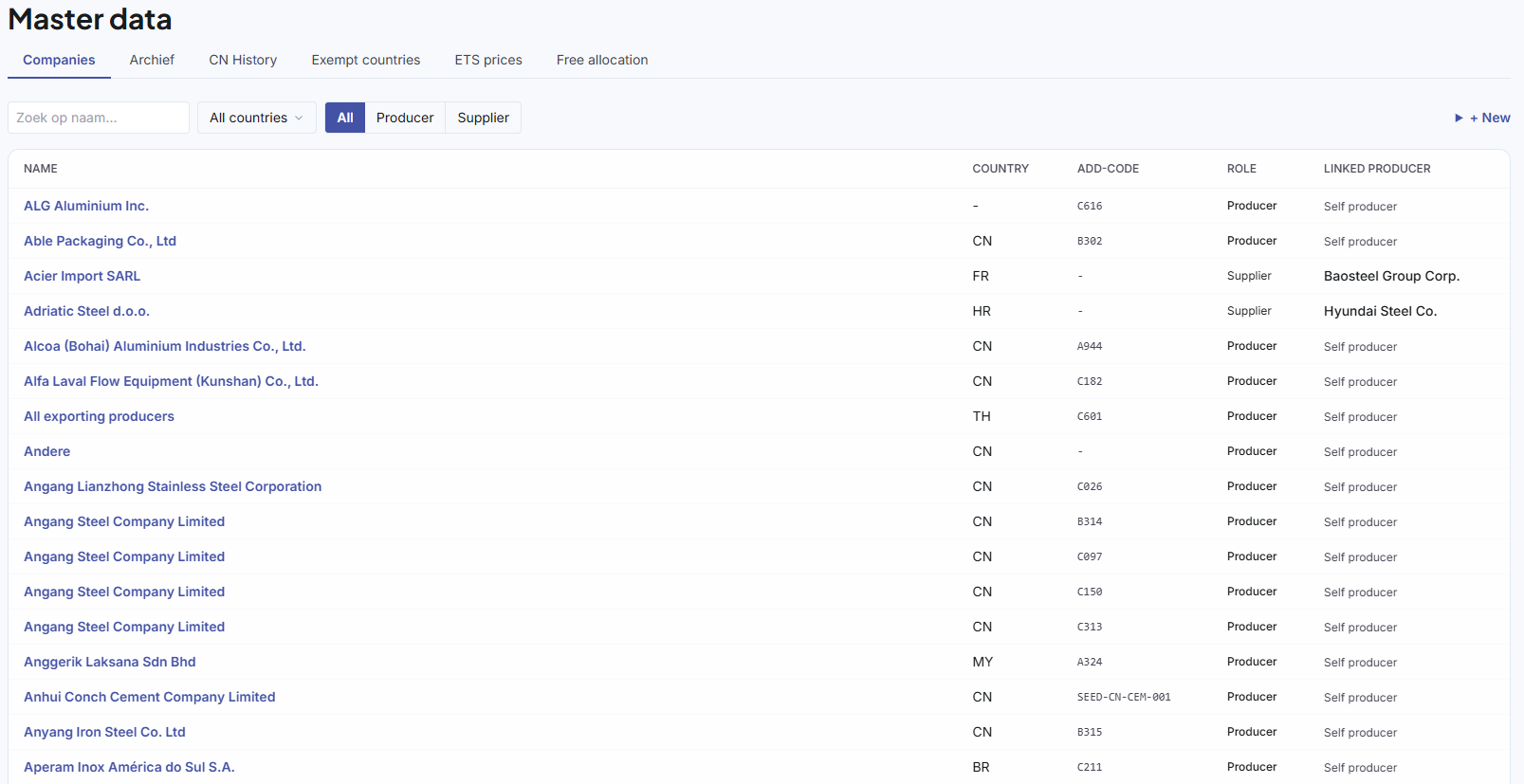
Automatische naamsherkenningAutomatic name recognitionAutomatische NamenserkennungReconnaissance automatique des noms
De Workspace vergelijkt binnenkomende namen met bekende partijen via fuzzy matching (RapidFuzz, token sort ratio ≥ 85%). Drie scenario's: The Workspace compares incoming names with known parties via fuzzy matching (RapidFuzz, token sort ratio ≥ 85%). Three scenarios: Der Workspace vergleicht eingehende Namen mit bekannten Parteien über Fuzzy-Matching (RapidFuzz, Token-Sort-Ratio ≥ 85 %). Drei Szenarien: Le Workspace compare les noms entrants avec des parties connues via le fuzzy matching (RapidFuzz, token sort ratio ≥ 85 %). Trois scénarios :
Bekende partijKnown partyBekannte ParteiPartie connue
Eerder bevestigd of hoog overeenkomstpercentage — direct gekoppeld, geen actie nodig.Previously confirmed or high match percentage — directly linked, no action needed.Zuvor bestätigt oder hohe Übereinstimmungsquote — direkt verknüpft, keine Aktion erforderlich.Précédemment confirmée ou pourcentage de correspondance élevé — liée directement, aucune action requise.
Waarschijnlijke matchProbable matchWahrscheinliche ÜbereinstimmungCorrespondance probable
Naam lijkt op een bekende partij — opgeslagen als onbevestigd. Dashboard toont melding: "X partijen wachten op bevestiging".Name resembles a known party — saved as unconfirmed. Dashboard shows notification: "X parties awaiting confirmation".Name ähnelt einer bekannten Partei — als unbestätigt gespeichert. Dashboard zeigt Meldung: „X Parteien warten auf Bestätigung".Le nom ressemble à une partie connue — enregistré comme non confirmé. Le tableau de bord affiche une notification : « X parties en attente de confirmation ».
Nieuwe partijNew partyNeue ParteiNouvelle partie
Volledig onbekende naam — aangemaakt als nieuw contact. Ga naar Masterdata → Leveranciers om te bevestigen of samen te voegen.Completely unknown name — created as new contact. Go to Master data → Suppliers to confirm or merge.Vollständig unbekannter Name — als neuer Kontakt angelegt. Gehen Sie zu Stammdaten → Lieferanten, um zu bestätigen oder zusammenzuführen.Nom complètement inconnu — créé comme nouveau contact. Allez dans Données de base → Fournisseurs pour confirmer ou fusionner.
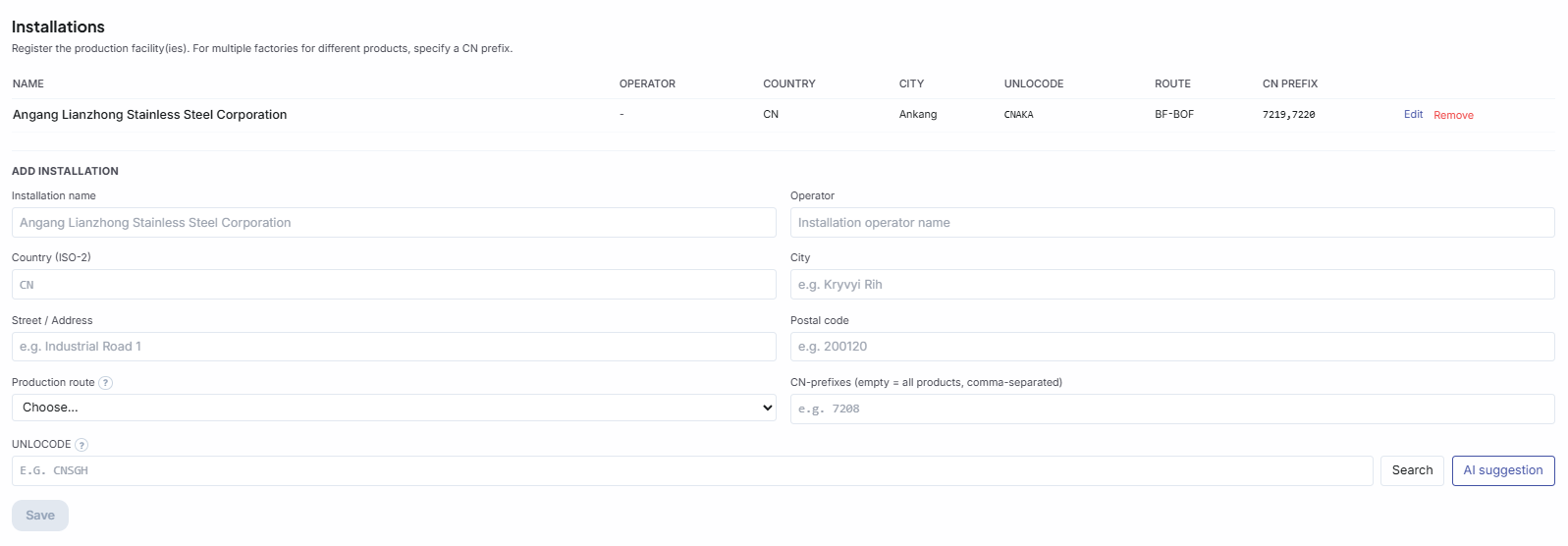
Productie-installaties toevoegenAdding production installationsProduktionsanlagen hinzufügenAjout d'installations de production
Het EU-rapport vereist per goederenregel de productie-installatie. Een installatie hoeft maar één keer te worden aangemaakt — alle volgende zendingen van dezelfde producent koppelen automatisch. The EU report requires the production installation for each goods line. An installation only needs to be created once — all subsequent shipments from the same producer link automatically. Der EU-Bericht erfordert pro Warenzeile die Produktionsanlage. Eine Anlage muss nur einmal angelegt werden — alle nachfolgenden Sendungen desselben Produzenten werden automatisch verknüpft. Le rapport UE exige l'installation de production pour chaque ligne de marchandises. Une installation ne doit être créée qu'une seule fois — toutes les expéditions suivantes du même producteur se lient automatiquement.
| VeldFieldFeldChamp | OmschrijvingDescriptionBeschreibungDescription | VerplichtRequiredPflichtfeldObligatoire |
|---|---|---|
| InstallatienaamInstallation nameAnlagennameNom de l'installation | Naam van de productielocatieName of the production siteName des ProduktionsstandortsNom du site de production | ✓ |
| LandCountryLandPays | ISO-2 | ✓ |
| UNLOCODE | Locatiecode (bijv. UA KRV) — Workspace suggereert automatischLocation code (e.g. UA KRV) — Workspace suggests automaticallyStandortcode (z.B. UA KRV) — Workspace schlägt automatisch vorCode de localisation (ex. UA KRV) — le Workspace suggère automatiquement | ✓ |
| ProductierouteProduction routeProduktionsrouteRoute de production | Bijv. BF-BOF, EAF, Bayer, Hall-HéroultE.g. BF-BOF, EAF, Bayer, Hall-HéroultZ.B. BF-BOF, EAF, Bayer, Hall-HéroultEx. BF-BOF, EAF, Bayer, Hall-Héroult | ✓ |
Producent koppelen aan leverancier Linking a producer to a supplier Produzenten mit Lieferant verknüpfen Associer un producteur à un fournisseur
Op de leveranciersdetailpagina vindt u twee tabs: Bestaande producent kiezen en Nieuwe producent aanmaken. Zolang er geen producent is gekoppeld, toont de amber badge "Anders" — wat betekent dat de EU-standaard emissiefactor wordt gebruikt. On the supplier detail page you will find two tabs: Choose existing producer and Create new producer. As long as no producer is linked, the amber badge shows "Other" — meaning the EU default emission factor is used. Auf der Lieferanten-Detailseite finden Sie zwei Tabs: Vorhandenen Produzenten auswählen und Neuen Produzenten anlegen. Solange kein Produzent verknüpft ist, zeigt das Bernstein-Badge „Anders" — das bedeutet, dass der EU-Standard-Emissionsfaktor verwendet wird. Sur la page de détail du fournisseur, vous trouverez deux onglets : Choisir un producteur existant et Créer un nouveau producteur. Tant qu'aucun producteur n'est associé, le badge ambré affiche « Autre » — ce qui signifie que le facteur d'émission par défaut de l'UE est utilisé.
Leverancier levert voor meerdere producenten? Supplier delivers for multiple producers? Lieferant beliefert mehrere Produzenten? Le fournisseur livre pour plusieurs producteurs ?
Koppel meerdere producenten aan één leverancier via de leveranciersdetailpagina. De Workspace kiest de juiste producent op basis van de producent-naam in de JSON. Als de producent ontbreekt in de JSON, vraagt de Workspace om handmatige toewijzing. Link multiple producers to one supplier via the supplier detail page. The Workspace selects the correct producer based on the producer name in the JSON. If the producer is missing from the JSON, the Workspace asks for manual assignment. Verknüpfen Sie mehrere Produzenten mit einem Lieferanten über die Lieferanten-Detailseite. Der Workspace wählt den richtigen Produzenten anhand des Produzenten-Namens in der JSON aus. Fehlt der Produzent in der JSON, fordert der Workspace eine manuelle Zuweisung an. Associez plusieurs producteurs à un fournisseur via la page de détail du fournisseur. Le Workspace sélectionne le bon producteur en fonction du nom du producteur dans le JSON. Si le producteur manque dans le JSON, le Workspace demande une attribution manuelle.